If you’ve just tried to print a document only to see faded lines or a completely blank page, don't panic—your printer isn't broken. The culprit is almost certainly a clogged print head. Because inkjet printer ink is a liquid, it relies on a precise balance of water and pigment. When your printer sits idle, that water evaporates, leaving behind a "crusty" residue that acts like a cork in a bottle, blocking the microscopic nozzles.
Whether you are using a standard tank or a high-performance ink cartridge, the goal is the same: clear the path so the ink can flow freely again. Let's break in.
Why Do Inkjet Print Heads Clog?
Inside your inkjet printer, the print head contains hundreds of microscopic nozzles—some thinner than a human hair. The inkjet printer ink inside these nozzles is a complex mixture of pigments, dyes, and a liquid "carrier". When you print regularly, the constant flow keeps everything lubricated. However, during long periods of inactivity, the liquid carrier at the very tip of the nozzle evaporates. This leaves behind a hardened, "crusty" residue of dried pigment.
Many people think their inkjet printer cartridge is empty because no ink is hitting the paper. In reality, the cartridge might be full, but the "gate" is locked.
How to Unclog Inkjet Print Heads
Step 1: Use Your Printer’s Built-in Cleaning Software
Before you roll up your sleeves for any manual work, your first line of defense is the software already living on your computer. Every modern inkjet printer comes equipped with a maintenance suite designed specifically to clean printer heads using internal pressure.
To start, navigate to your printer’s "Properties" or "Preferences" menu on your computer, or look for the "Maintenance" icon on the printer’s LCD screen. You will usually see two options: a "Standard Clean" and a "Deep Clean."
Standard Cleaning: This uses a small amount of inkjet printer ink to flush out minor blockages. It’s perfect if you noticed a few tiny streaks on a recent print.
Deep Cleaning: This is the "heavy hitter." It uses more force and more ink to push through stubborn, dried-up residue.
Step 2: The Importance of Print Head Alignment
Once you’ve successfully cleared the blockage, you aren’t quite finished yet. The process of cleaning—especially a deep clean—involves a lot of mechanical movement and pressure. This can sometimes slightly shift the way the print head interprets the "map" of your page.
If your text looks blurry or your straight lines look jagged after cleaning, you need to perform a print head alignment. This is a simple automated process found in the same maintenance menu. The printer will print a test sheet with numbered patterns. You simply look at the page, identify which pattern looks the straightest, and enter those numbers into the software.It ensures that every drop of ink from your ink cartridge lands exactly where it’s supposed to, keeping your inkjet printing crisp and sharp.
Step 3: The Manual Method for Stubborn Clogs
Sometimes, the internal software just isn't enough to break through months of neglect. If you've run your cleaning cycles and the printer head is still stubborn, it’s time for the manual soak.
Access the Print Head: Open your inkjet printer and wait for the carriage to move to the center. Unplug the power cord so the carriage stays put.
Remove the Cartridges: Carefully take out each inkjet printer cartridge. Place it upright on a piece of plastic wrap to prevent the exit port from drying out further.
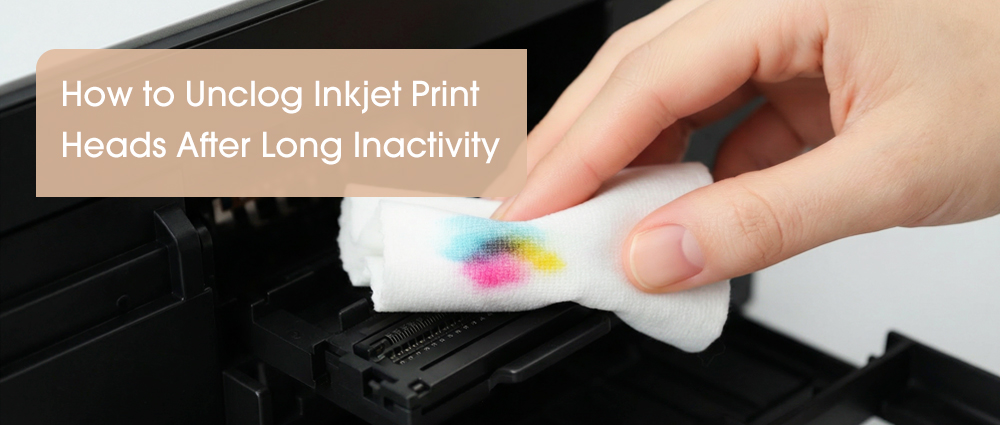
The Damp Blot: Fold your lint-free cloth and dampen it with the warm water. Gently press it against the bottom of the print head (the area where the ink comes out). Do not scrub. Simply hold it there for 30–60 seconds.
The "Paper Towel" Trick: For removable print heads, you can actually set the unit onto a damp paper towel and let it sit for an hour. You will see "bruises" of color appearing on the towel as the dried inkjet printer ink begins to liquefy and "wick" out.
Why Your Cartridge Choice Matters
In printing industry, you truly get what you pay for when it comes to the chemistry of the ink. Many "no-name" bargain cartridges use low-grade ink that lacks the necessary lubricants and humectants. These cheap formulas dry out significantly faster, turning into a rock-hard residue that can permanently damage your printer head.
This is where a G&G ink cartridge stands out. G&G invests heavily in R&D to ensure their inkjet printer ink matches the viscosity and surface tension of the original manufacturers. Our formulas include advanced "stay-wet" additives that keep the nozzles lubricated even if you don't print every day. By using high-quality supplies, you aren't just getting better colors; you are actually performing "passive maintenance" every time you print.
Saving money on printing isn't just about how you handle the cartridge—it’s about changing your mindset from "price per cartridge" to "yield per grain." Most experts focus on the hardware, but the real secret to long-term savings lies in the chemistry of what you put inside. Low-quality, "bargain" toners often have irregular shapes that lead to massive waste in the overflow bin, meaning you're paying for powder that never even hits the paper.
A clogged print head is a minor speed bump. you can extend the life of your hardware by years by understanding the science of cloging. Investing in a high-quality ink cartridge is the smartest move you can make to ensure your inkjet printing stays vibrant and your nozzles stay clear. Remember, a little proactive care today saves you from the cost of a new printer tomorrow. Keep that ink flowing, and your printer will reward you with crisp, professional results every time.